

Gaming posture - A health risk sounds dramatic, but if your neck, shoulders, and back always hurt after “just one more match,” your body is already sending warnings. Long hours of slouching over a controller or keyboard slowly overload your spine, tighten your muscles, and can even trigger headaches, chest tightness, and numbness in your hands.
In this article, Back Hero USA breaks down why gaming posture is more than a cosmetic problem, how it can quietly damage your health, and what you can do to fix it. You will also see how tools like the Back Hero USA Posture Corrector and Lumbar Support Cushion can support better alignment at your gaming setup, and where to learn more about posture correctors before you buy.
This guide is for general information, not medical advice. Always talk to a healthcare professional about serious or persistent symptoms.
In this article
What Is Gaming Posture and Why It Becomes a Health Risk

Gaming posture - a health risk for many players - usually starts as a comfortable slouch that slowly turns into a habit. When you repeat the same rounded, forward leaning position every day, your spine, muscles, and nerves begin to adapt in ways that are not friendly to your long term health.
Common positions gamers fall into
If you watch yourself from the side, you will probably see a classic gaming setup:
- Head pushed forward toward the screen
- Shoulders rounded and pulled in
- Upper back hunched
- Lower back either overarched or completely collapsed
- Hips stuck in one position for hours
At first this feels “normal,” but your muscles and joints pay the price.
How gaming posture - a health risk builds up over time

Your body can handle short bursts of bad posture. The problem is when you stack hour after hour, day after day, in the same stressed position. That is when gaming posture becomes a real health risk:
- Muscles stay tight and tired
- Joints and discs take more load
- Nerves pass through compressed spaces
- Blood flow and breathing become less efficient
The result can be pain, stiffness, headaches, tingling, and overall fatigue that follows you even when you log off.
How Bad Gaming Posture Hurts Your Body

Once gaming posture becomes a habit, the health risk spreads from your neck to your shoulders, back, hips, and even your breathing. The more you play in the same slouched position, the more your whole body has to compensate.
Neck and shoulder strain
Forward head posture is one of the biggest issues for gamers. Each centimeter your head moves forward multiplies the load on your neck muscles and joints. Over time this can cause:
- Stiff neck and upper back
- Tension headaches that start at the base of your skull
- “Tech neck” style pain after long sessions
If you want specific corrective exercises, you can dive deeper with How to Fix Tech Neck? 10 Best Exercises once that guide is live on your site.
Back, hips, and circulation
Slouching in your chair might feel relaxed, but your spine and hips disagree:
- A rounded lower back compresses spinal joints
- Hips stay locked in one angle, which can tighten hip flexors and hamstrings
- Sitting still for hours slows blood flow in your legs
This can show up as lower back pain, hip discomfort, or that heavy, tired feeling when you finally stand up.
Headaches, fatigue, and focus
Poor gaming posture does not only hit your muscles. It can also:
- Restrict breathing so your brain gets less oxygen
- Increase tension and stress responses
- Make you feel more tired, foggy, and irritable
Over time this can impact mood, sleep, and even your in game performance.
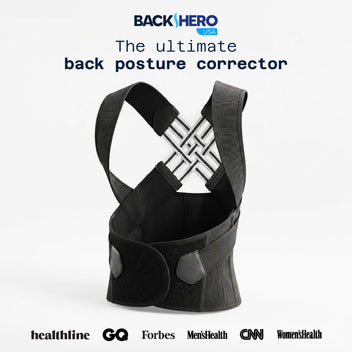
Back Hero USA Posture Corrector for Women & Men designed to heal, relieve upper back pain, and correct poor...
How to Fix Gaming Posture Without Quitting Games
Gaming posture is a health risk, but it is also fixable. You do not need to quit games, you just need to change how your body spends those hours in front of the screen.
Quick setup checklist for a spine friendly gaming station
Aim for this as a baseline:
- Screen at or slightly below eye level
- Chair height so your feet rest flat on the floor
- Knees roughly at hip level, not jammed up or hanging down
- Back supported with a natural curve, not flattened or overarched
- Controller or keyboard within easy reach so you do not lean forward
Small changes to your desk, chair, and screen position can remove a lot of unnecessary strain.
Movement and break habits for gamers
Even perfect posture becomes a problem if you hold it forever. Build in simple habits:
- Stand up between matches
- Walk around for 1 to 2 minutes every 30 to 60 minutes
- Roll your shoulders and gently turn your head side to side
- Stretch your chest, hip flexors, and hamstrings
Think of it as “cooldown and reload” time for your body.
Helpful Tools for Better Gaming Posture
Because gaming posture is a health risk built on repetition, tools that gently guide your body can make a big difference. They do not replace movement or exercise, but they make good posture easier to hold.
Back Hero USA Posture Corrector for upper body alignment

The Back Hero USA Posture Corrector is designed to support your upper back and shoulders while you sit. For gamers, that means:
- A gentle cue to stop rounding your shoulders toward the screen
- More open chest position which makes breathing easier
- Less constant strain on neck and upper back muscles
Use it in short sessions at first, such as one or two games at a time, to avoid relying on it completely. If you want to understand what to look for before you buy any brace, you can later explore Posture Corrector – What to Know Before Buying as a more detailed shopping guide.
Lumbar Support Cushion for long sessions

Your lower back needs love too. A Lumbar Support Cushion fills the gap between your lower back and the chair so you avoid collapsing into a C shape. This helps you:
- Maintain a gentle, natural curve in your spine
- Sit more upright without feeling like you must constantly “hold” your posture
- Reduce lower back fatigue during long gaming sessions
Together, Back Hero and a lumbar cushion make your chair behave much more like an ergonomic seat instead of a random gaming throne that just looks cool.
Simple Daily Habits To Protect Your Gaming Spine

To reduce the health risk of gaming posture long term, you need habits that support your spine even when you are not in front of a screen. Small daily changes compound over months and years.
You can stack small wins that protect you every day:
- Set a timer to remind you to stand and stretch
- Keep water nearby and stay hydrated
- Alternate intense sessions with lighter games or breaks
- Do a short posture or stretch routine before and after gaming
- Sleep with good pillow support so your neck can recover
None of these habits are difficult, but they are powerful when you repeat them.
Conclusion: Gaming Smarter, Not Just Harder
Gaming posture - a health risk does not mean gaming is bad. It means long hours in one position will shape your body, for better or worse. Forward head posture, rounded shoulders, and a collapsed lower back can turn into real pain if you ignore them, but they are also very fixable with the right strategy.
With a smarter setup, regular movement, and supportive tools like the Back Hero USA Posture Corrector and Lumbar Support Cushion you can protect your spine while you play, climb ranks, and enjoy longer sessions with less pain.
Frequently Asked Questions
1. Is gaming posture really a health risk or just discomfort?
Yes, gaming posture can be a real health risk. At first it feels like simple stiffness or soreness, but over time constant slouching can lead to chronic neck pain, back pain, headaches, and even nerve irritation in the arms and hands.
2. How do I know if my headaches or neck pain are from gaming posture?
If your symptoms get worse after long gaming sessions and improve when you stretch, move, or sit taller, posture is probably a big part of the problem. Stiff neck, tight shoulders, and a heavy feeling at the base of your skull are classic signs.
3. Can a posture corrector help with gaming posture?
A good posture corrector can give gentle support to your upper back and shoulders and remind you not to hunch toward the screen. It works best together with movement breaks, stretches, and an ergonomic setup, not as a replacement for them.
4. How often should I take breaks while gaming?
A simple rule is to move at least every 30 to 60 minutes. Stand up, walk, roll your shoulders, and stretch your chest and neck. Short, frequent breaks protect your spine better than one long break at the end.
5. When should I see a doctor or chiropractor about gaming posture?
You should see a professional if you have pain that does not improve with simple changes, numbness or tingling in your arms or hands, strong headaches, chest pain, or any symptom that feels new, intense, or worrying. They can check for serious issues and give you a clear plan.

