

Working from home should feel flexible and productive, not painful. The right 10 tips for home office ergonomics can reduce neck strain, lower back pain, and shoulder tension so you can focus on your work instead of your discomfort.
In this guide, Back Hero USA walks you through practical ergonomic fixes you can apply today, from chair height and screen setup to smart posture tools. You will also see how Posture Corrector, Lumbar Support Cushion, and Pressure Relief Seat Cushion support healthier alignment during long hours at your home desk.
In this article
Why Home Office Ergonomics Matters
A good chair is not enough. Home office ergonomics is about how your entire setup works with your body. When your desk is too high, your screen is too low, and your back has no support, your muscles work overtime. Over time that can lead to neck pain, tight shoulders, headaches, and stiff hips.
The 10 tips for home office ergonomics below help you stack your spine, relax your shoulders, and let your muscles share the effort instead of dumping it all into your lower back.
10 Tips for Home Office Ergonomics

1. Set your chair height for grounded feet
Your feet should rest flat on the floor, not dangle.
- Adjust your chair so your hips are at or slightly above knee level
- Keep both feet flat or use a small footrest if the floor is too far
- Avoid tucking one leg under you or crossing your legs all day
Grounded feet give your spine a stable base and reduce pressure on your lower back.
2. Support your lower back with a lumbar cushion

Most dining chairs and basic office chairs do not support the natural curve of your lower back. That is where the Lumbar Support Cushion comes in.
It helps you:
- Fill the gap between your lower back and the chair
- Maintain a gentle, natural curve instead of collapsing into a C shape
- Stay more upright without constantly “holding” yourself up
If you want a deeper dive into sitting mechanics, a dedicated guide like Proper Sitting Posture: How to Correct a Bad Sitting Posture? can pair very well with this tip once it is live on your site.
3. Use a pressure relief seat cushion for long sitting

Hard chairs and flat surfaces put constant pressure on your tailbone and sitting bones. Over time this can cause numbness, soreness, and more slouching.
The Pressure Relief Seat Cushion can help by:
- Redistributing pressure away from your tailbone
- Encouraging a more neutral pelvic position
- Making long sitting more comfortable so you slouch less to escape discomfort
- It is especially useful if you sit on dining chairs, bar stools, or firm office chairs at home.
4. Position your screen at eye level
Looking down at a laptop for hours is one of the fastest ways to create tech neck.
- Raise your laptop with a stand or stack of books so the top of the screen is near eye level
- Keep the screen about an arm’s length away
- Avoid twisting your neck to look at a side screen all day
This reduces the forward head posture that strains your neck and upper back.
5. Keep your keyboard and mouse at elbow height
Your elbows should sit close to your body and bend around ninety degrees while you type.
- Adjust your chair or desk so your forearms are roughly parallel to the floor
- Keep your keyboard and mouse close so you are not reaching forward
- Relax your shoulders instead of hunching them up toward your ears
For more detailed wrist, arm, and shoulder tips, an article such as Proper Typing Posture for Office Workers: Avoid Neck and Back Pain will support this step nicely as part of your internal linking.
6. Use Back Hero USA Posture Corrector for gentle reminders

Even with the best setup, it is easy to slide back into old habits. Back Hero USA Posture Corrector gives your upper back a gentle cue to stay more open and aligned.
Key benefits while working from home:
- Guides your shoulders back so you do not round forward into the screen
- Opens your chest which makes breathing and focus feel easier
- Reduces some of the tension in your neck and upper back during long sessions
Key features:
- Lightweight, breathable fabric that feels comfortable for daily use
- Adjustable straps to fit different body types
- Slim design that can be worn under many tops
Use Back Hero USA in short blocks, such as 20 to 30 minutes at a time, to build awareness without letting your muscles become lazy.
7. Arrange your desk so items are within easy reach
Constantly twisting or reaching across the desk can irritate your shoulders and mid back.
- Keep your most used items (mouse, notebook, phone) within easy reach
- Place heavy items so you do not need to lean and twist to grab them
- Use a headset instead of cradling the phone between your ear and shoulder
- Small layout changes can reduce a lot of hidden strain.
8. Keep your hips, knees, and ankles aligned
Think of your lower body as a stacked line rather than a zigzag.
- Hips facing straight toward the screen
- Knees in line with hips, not collapsing inward or falling outward
- Ankles under knees with feet pointing forward
This alignment protects your knees and hips and helps your spine sit in a more neutral position.
9. Take movement breaks every 30 to 60 minutes
Even the best ergonomic setup cannot replace movement.
- Stand up, stretch, or walk around for one or two minutes
- Roll your shoulders, look away from the screen, and reset your posture
- Use calendar reminders or phone alarms if you tend to forget
These “micro breaks” keep your joints lubricated and your muscles less tight.
10. Separate work mode and rest mode
Working from the bed, sofa, or floor might feel cozy, but it usually destroys your posture.
- Reserve your bed for sleep and true rest
- Try to keep at least one spot in your home that is set up as a real workstation
- Use your ergonomic tools there so your body knows “this is where we sit and work well”
Your spine will thank you for the clear boundaries.
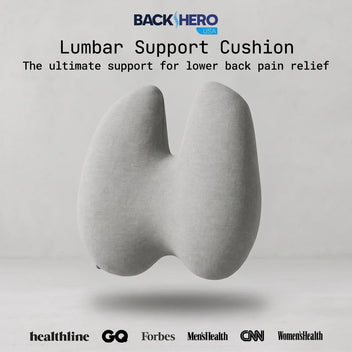
Back N Spine Lumbar Support Cushion offers ergonomic comfort, relieves lower back pain, improves posture, a...
Conclusion
A home office should support your body, not slowly wear it down. With these 10 tips for home office ergonomics, you can adjust your chair, desk, and screen, move more during the day, and add smart supports that reduce strain on your spine.
Tools like Back Hero USA Posture Corrector, the Lumbar Support Cushion, and the Pressure Relief Seat Cushion do not replace good habits, but they make those habits much easier to keep.

